Manage automations and follow-ups
Review the automatic follow-ups, their switches, timing controls, and delivery limits.
What the switches do
An Admin or Owner can open Setup and choose Automations. This is a fixed gallery, not a flow builder. The five switches control quote follow-up, lead follow-up, rating reminder, seasonal offers, and customer reactivation. Turning a switch on or off saves the organization setting; it does not send a message immediately. There is no Run now button. Use the ordinary Quotes, Pipeline, Reviews, Suggestions, or customer screens when someone needs attention sooner.
Read the Marketing or Transactional label, the next-run estimate when shown, and the delivery notices before turning anything on. A count estimates eligible work; it is not proof that a provider delivered a message. Opt-outs, quiet hours, and compliance rules can still block marketing messages.
Understand the follow-up timing
Quote follow-up is scheduled for days 2, 4, and 7 after a quote is sent; it stops when the quote is accepted or declined. Lead follow-up runs on day 1 and day 5 after an unanswered inquiry is created, then stops when it is claimed, closed, or converted. A rating reminder is one additional message after its configured delay and stops when a rating arrives.
Seasonal offers and reactivation are single-pass work during each organization's local morning window, not repeating message sequences. The screen's estimates and Sent in 30 days are queue counts, not provider-delivery receipts. A switch that is off is skipped by future scheduled passes; turning it back on may let a later pass consider eligible work again.
Set inquiry alerts and timing
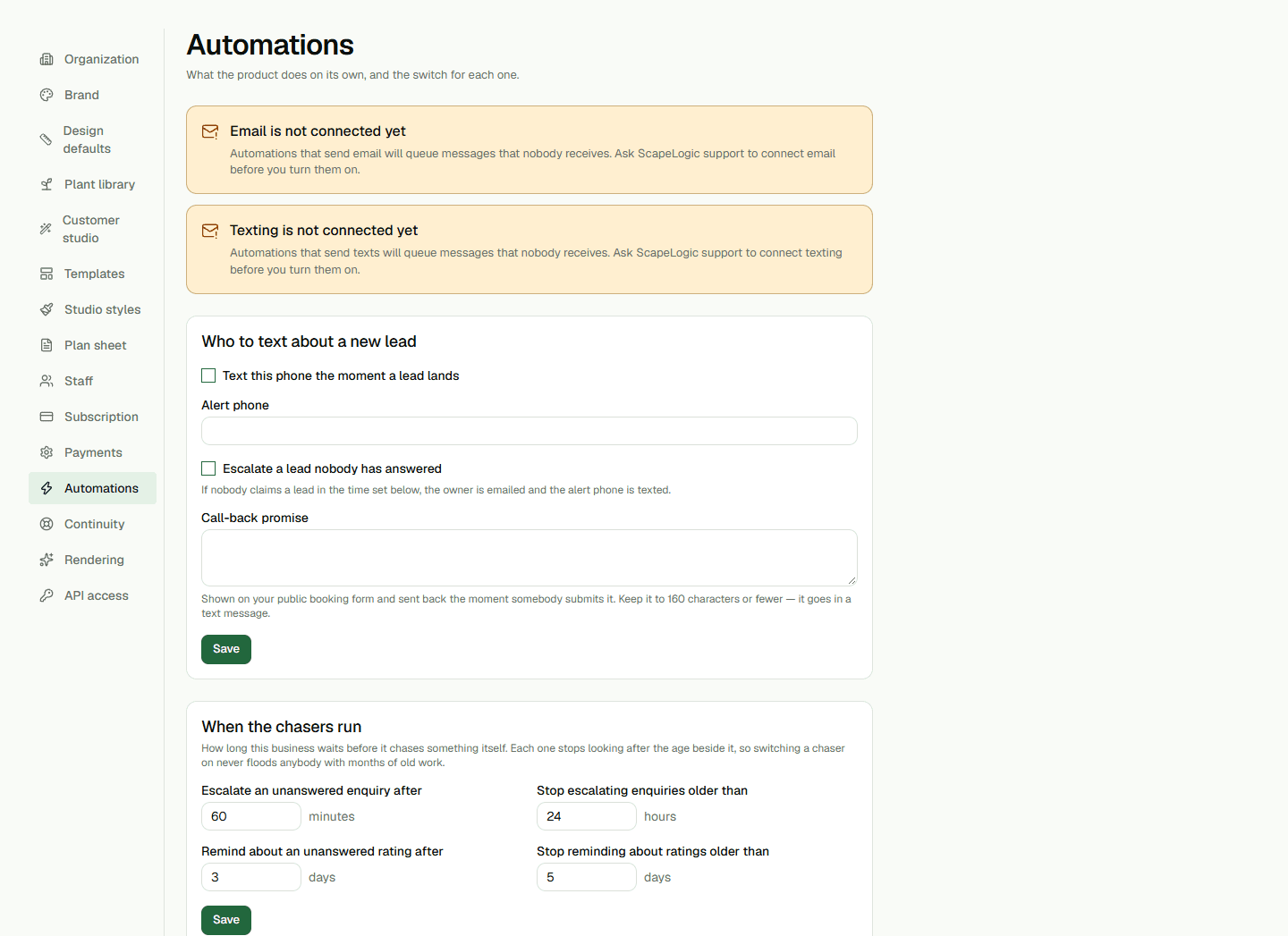
The separate Who to text about a new lead form has independent switches for an arrival text and escalation of an unanswered lead. An enabled text alert needs an E.164 phone number. Escalation can email the owner and text the alert phone after its delay; older inquiries are excluded by the configured age ceiling. The form also sets the call-back promise shown after a public inquiry, up to 160 characters.
When the chasers run contains organization-level delays and age ceilings for lead escalation and rating reminders. These timing fields do not add a manual run control. If a save fails, the row reports the error; do not assume the setting changed.
Check delivery and scheduled work
Email is not connected yet or Texting is not connected yet means those messages can queue without reaching anyone. Ask the administrator or support contact to complete channel setup before enabling the affected automation. If an automation stops early, the row may show that its target was resolved; this is a normal stop, not a failure.
The separate Health page records the latest status and run time for scheduled steps when available. It is not a full run history and does not prove that an email or text provider delivered a message. Static hosting schedules do not prove that the application's database scheduler is installed or currently running.