For landscape companies running two to eight trucks
Stop running your company out of four different apps
Schedules, crews, properties, quotes, invoices and every client conversation in one place. Your crews get today's work on their phones, your clients stop calling to ask when you are coming, and you finally know which jobs made money.
No card required. Import your customer list and be running this afternoon.
 AI rendering of the design
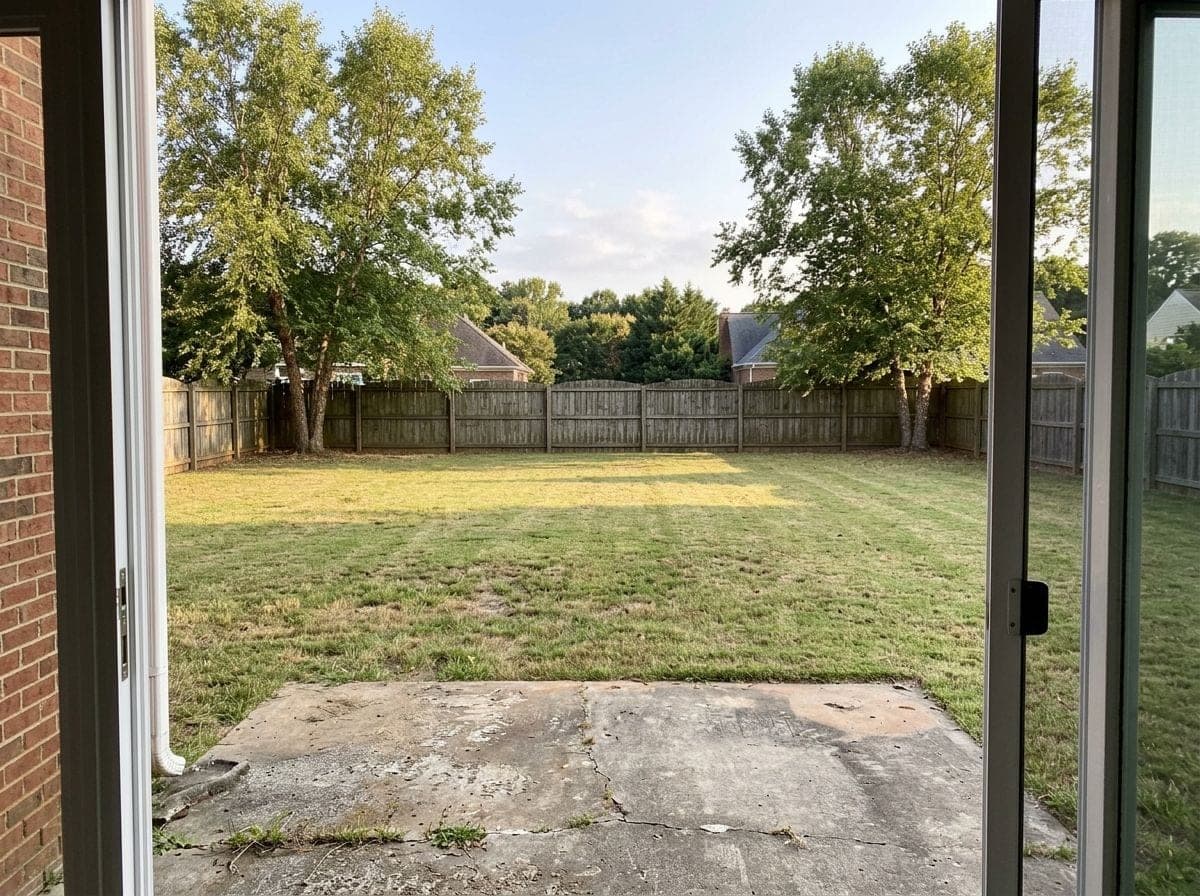 Before
- Built for the two to eight truck operator
- Unlimited seats on every plan
- No cut of your revenue
- Export everything, any time
- Month to month, no minimum term
- The prices are on this page, and there is no setup fee
You already have a system. It is just spread across four things.
- The schedule is in a spreadsheet that only makes sense to you, and it is wrong by Thursday.
- The gate codes and the dogs are in a group chat, so a new crew leader learns them the hard way.
- The invoices are a stack on the kitchen table, and the ones nobody paid are in the same stack.
How it goes
Three steps, and the first afternoon is the hard part. After that the week arrives already built.
01
Bring your customer list over
Upload the spreadsheet you already keep. Duplicates are caught before they land, and what does not match is shown to you rather than guessed at.
02
The week fills itself
Put your customers on the service plans they are already on, and three weeks of visits appear on the board with the gate code, the dog and the arrival window already on them.
03
Crews work off their phones, and the invoices follow
They arrive, photograph and complete. The hours come off the work, the invoice comes off the job, and your client pays it from the same link that told them you were coming.
What you will actually open every day
Five screens carry most of a week. Each one is a real capture of the product in production.
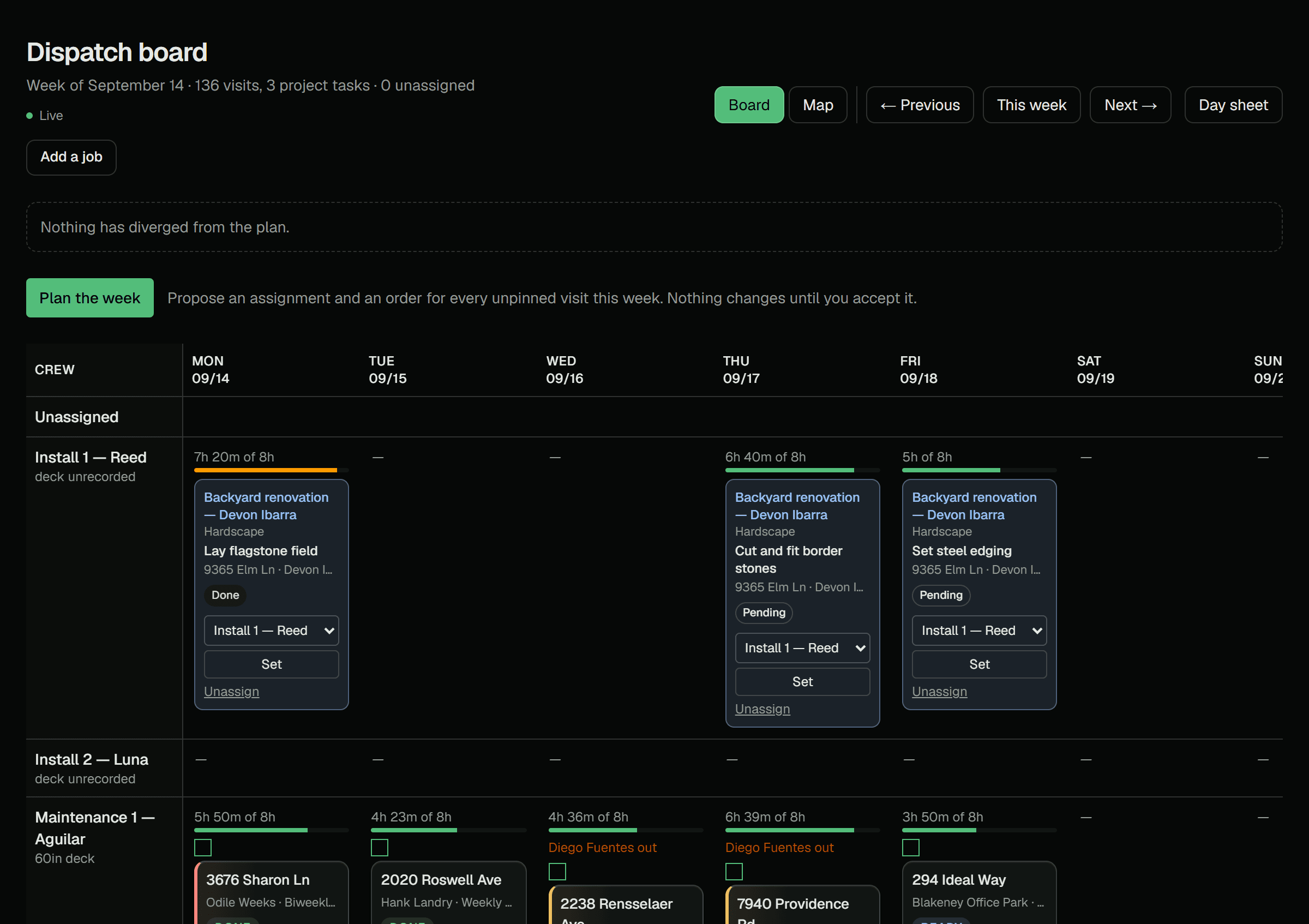
The board
See the whole week before Monday happens
One board with every crew and every stop on it. When a crew finishes out in the field the board shows it while you are looking at it, and the clash you would have heard about from a driveway is on the screen in front of you instead.
- Drag a job to another day or another crew and it moves
- The gate code, the dog and the arrival window travel with the address
- Plan the week proposes crews and a driving order for each day; nothing moves until you accept it
- Every morning it lists what is broken: double-booked, unassigned, unmeetable
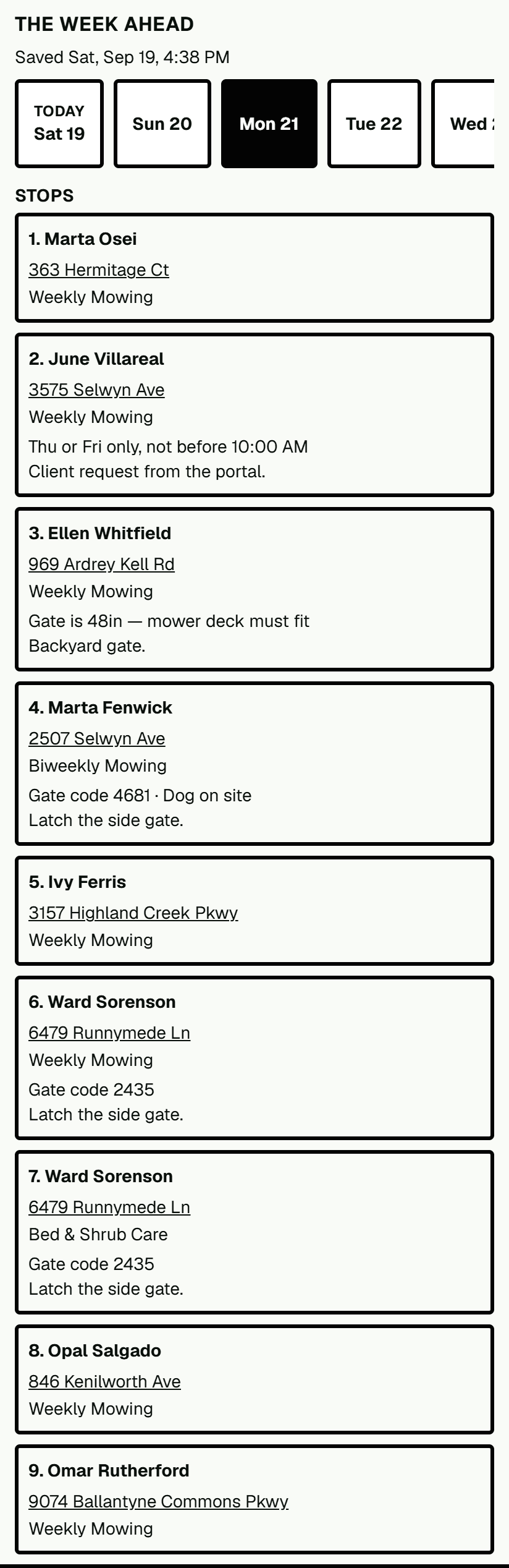
The truck
Your crew gets the day without you explaining it
Today's stops in order on the phone in their pocket, with what each one needs at the curb, and the rest of the week saved on the phone behind it. It keeps working where there are no bars, and their hours come off the work rather than off what somebody remembers on Friday.
- Works with no signal, and catches up when the truck finds a road that has some
- The week ahead, gate codes and all, is on the phone before the truck leaves the yard
- Photographs go straight from the phone into the property's record
- English and Spanish, chosen per person on their own phone
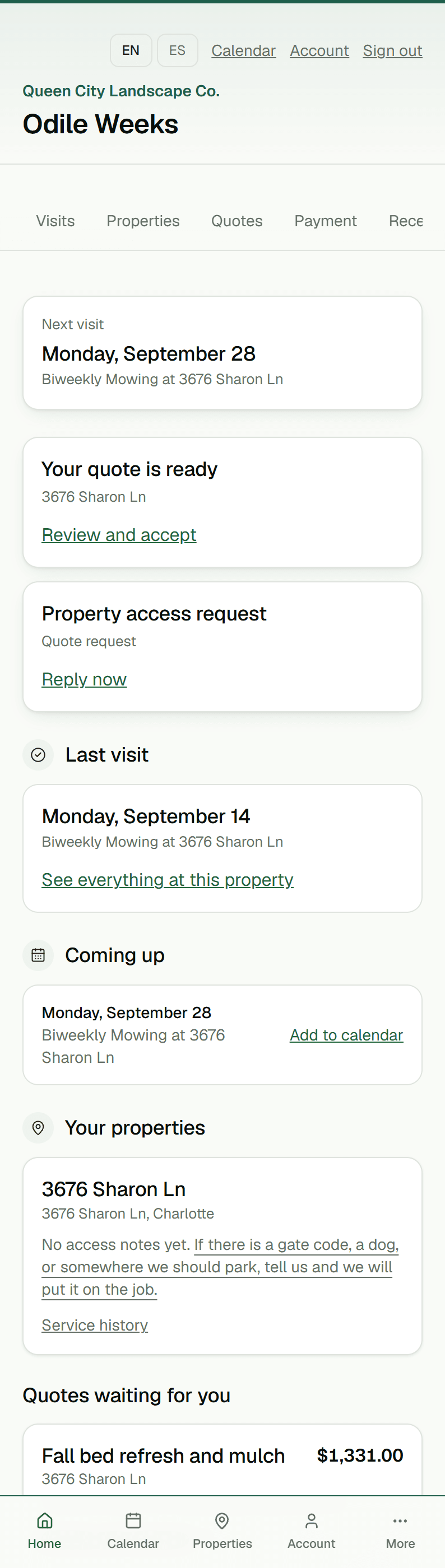
The client
They stop calling to ask when you are coming
A page with your name on it, opened from a link in a text. Next visit and the window for it, what you did last time, the photographs, the invoice, and a button to pay it.
- No password, so no reset, so no phone call to your office
- Skip, move, pause or change the gate code without ringing you
- Every request lands in one queue with an approve or decline next to it
The design
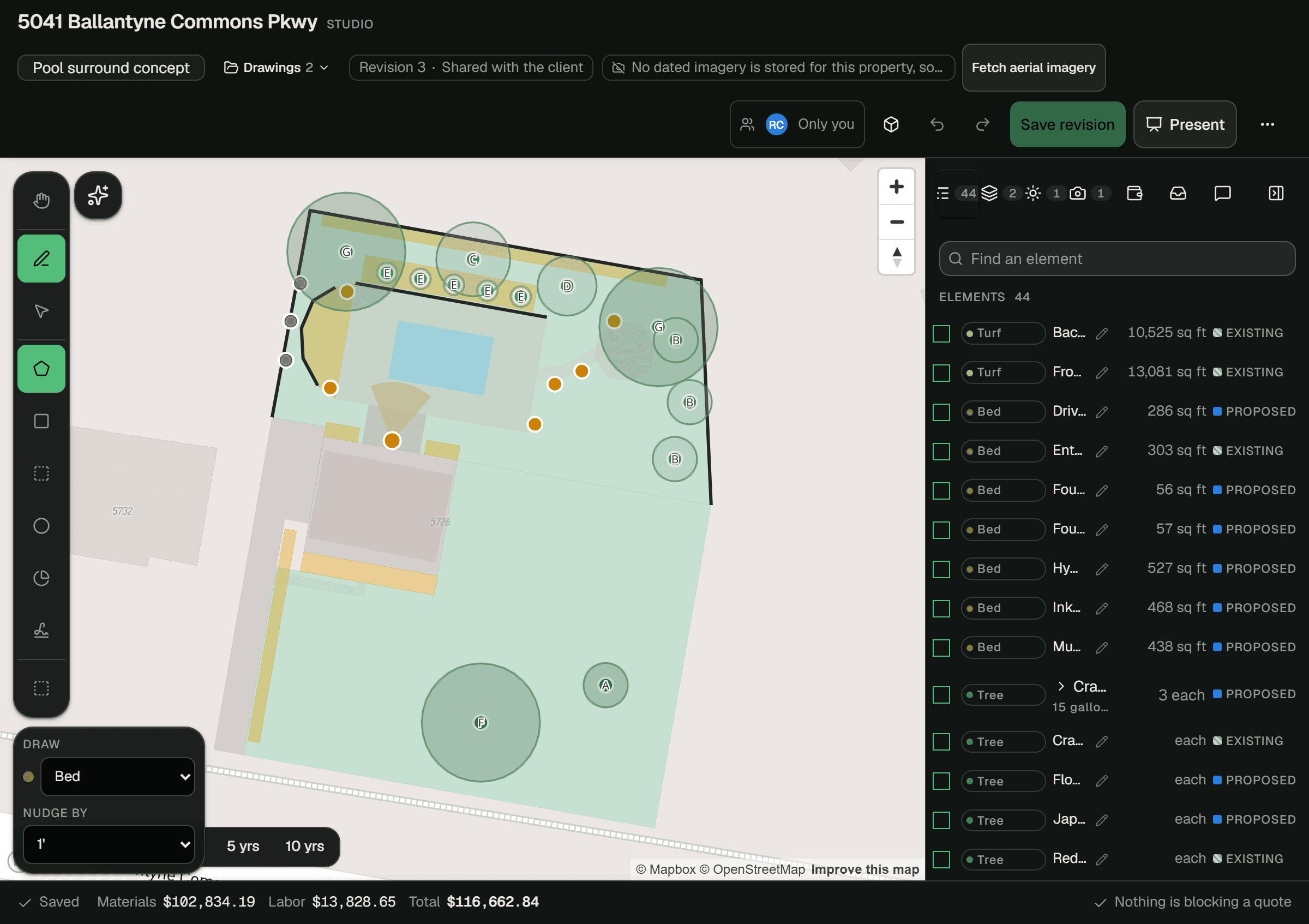
Draw the yard, and the price draws itself
Trace the property from the aerial, lay down beds, patios, lawn and plants, and the materials, labor and total add up while you draw. The same drawing becomes the plan sheet, the quote and a picture of the finished yard for the client.
- Every square foot you draw is priced at your own rates
- A plan sheet to scale, with the plant names on it, ready to print or send
- Render the design into a photo from the client's own back door
The money
The invoice goes out on Tuesday, not on Sunday night
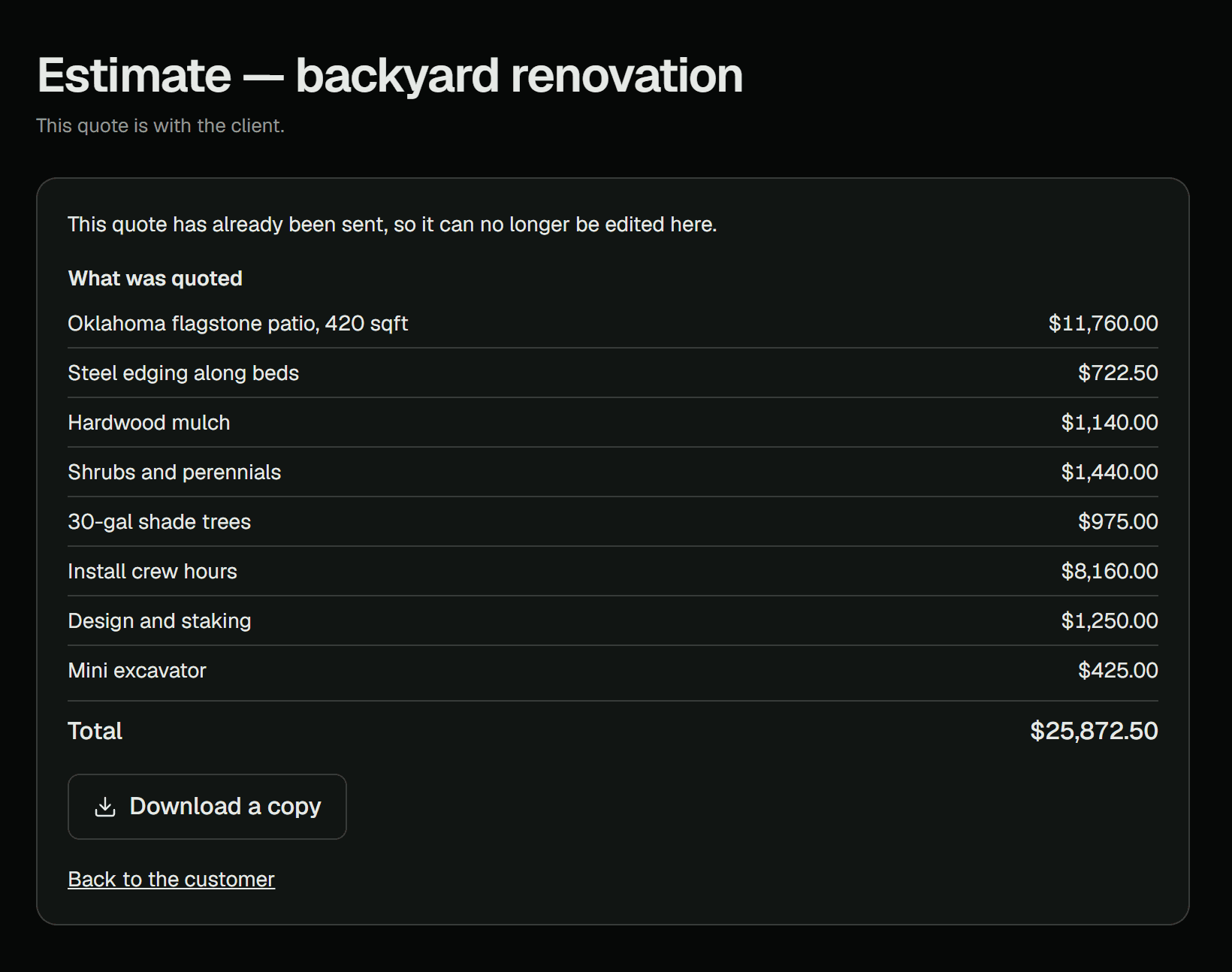
Finished work becomes an invoice with the labor and the materials already on it. Your customer pays it by card from the portal, into your own account, and the late ones are chased on a schedule instead of never.
- Card payments land in your own Stripe account; we take no cut
- Fourteen days, twenty-one, twenty-eight — the chasing is already decided
- Payroll, revenue and receivables come out as files your accountant can open
And the rest of it
Two more areas, each with its own page and its own screenshots.
Priced on routes, not on people
Every plan includes unlimited seats — put the whole crew on it, because a business deciding whether a new hire is worth a login is a business getting worse data. We take no cut of what your clients pay you.
The plans differ in one number: how many routes can run in a day. Everything above — the board, the crew app, the portal, the design studio, quoting, invoicing, the exports — is in every plan. A Starter company runs the same product the top plan does, just with fewer trucks.
This is the eighty per cent you would actually turn on, live in a week, at the price on the website.
Your data, and what stops anybody else reaching it
None of this is a promise about intentions. Each line is a thing the system does, and most of them are enforced below the application, where a mistake in a screen cannot get around them.
One company cannot see another company
Separation is enforced by the database on every read, not by a filter somebody remembered to add. A query that forgets which company it is asking about returns nothing.
Your clients are not staff, and cannot become staff
The client portal runs on its own session with no credentials for the office system at all. One customer's portal cannot reach another customer's anything.
Nothing is deleted, and corrections are visible
Arrivals, approvals, payments and changes are added to, never overwritten. A correction is a new entry and the old one is still there, with who made it and when.
The crew's phone never holds a key
It is given permission for one photograph, to one place, and that permission expires. A phone left on a tailgate is a lost phone, not a lost account.
The sign-in cookie cannot be read by a script
It is marked so the browser will not hand it to any JavaScript on the page, which is the difference between one bad script and somebody else's session.
You can take everything, on any plan
Customers, properties, plans, invoices, payments, hours, photographs and history, in open formats, whenever you ask. Leaving is allowed — that is what makes it safe to stay.
Questions people ask before they sign up
The eight that come up on the phone, answered the way they would be answered on the phone.
Does it work with no signal?
The crew app does. Arriving, photographing, completing and saying why a stop could not be done all work with the phone offline, and go up when the truck reaches a road with bars. The office keeps a read-only copy of the day on the computer for when the internet drops, and the morning email carries the day sheet as a PDF. The portal is a normal web page and needs a connection.
Can I bring my customers over from Jobber, LMN or a spreadsheet?
Yes. Export a spreadsheet from whatever you use now and upload it. Duplicates are caught before anything lands, and rows that do not match cleanly are shown to you to decide rather than guessed at. Bring your documents and photographs the same way.
Do I pay more for each employee?
No. Every plan includes unlimited seats. Put the office, every crew leader and every field crew member on it — a business deciding whether a new hire is worth a login is a business getting worse data.
Can my clients pay by card?
Yes, from the portal, and the money goes into your own Stripe account under your own name. You connect it once in settings. The card fee is Stripe's; there is no cut for us on any plan and no holding period.
What happens to my data if I leave?
You take all of it. Customers, properties, service plans, invoices, payments, crew hours, photographs and the full history, in open formats, on any plan, whenever you ask. That is written into the terms, not just into a page like this one.
Do you sync with QuickBooks?
Not two ways, and that is on purpose — two-way sync is the highest-support-burden feature in this category and it is what people complain about most in the products that have it. Invoices and payments queue for QuickBooks from your first day, so connecting it in March still sends January across.
How long does setup take?
An afternoon to import your customer list and put them on their service plans. After that the week builds itself three weeks ahead. Getting your crews onto their phones is the next morning's ten minutes.
Is there a contract?
Month to month. No card to start the trial, no minimum term, and the annual price is simply two months cheaper if you would rather pay once. Cancel and take your data with you.
What it does not do yet
No two-way QuickBooks sync, no telematics, and no CAD. If one of those decides it for you, it is better that you know now than in your second week.
Put the whole thing in one place this afternoon
Import your customer list, put them on the plans they are already on, and open the board tomorrow with the week already built.
No card required. Unlimited seats. Export everything, any time.